- This topic is empty.
-
AuthorPosts
-
06/11/2026 at 09:21 #7099
5G RedCap promises 5G network access at lower cost and power than full 5G, which makes it attractive for sensors, gateways, meters, and edge devices. Buying RedCap routers directly from the factory adds speed and engineering access. But RedCap projects have their own pitfalls: coverage requirements that differ from LTE, interface choices that are easy to get wrong, and expectations about speed that do not always match the technology.
This checklist covers what to confirm before ordering from a 5G RedCap router factory-direct supplier, and what to plan for during deployment. It uses the E-Lins RedCap range as the example throughout.
Part 1: Before You Order
Check 1: Is 5G standalone available at your sites?
RedCap relies on 5G standalone networks with a 5G core. Confirm with the operators at your sites that standalone service is available, not only non-standalone 5G. Where it is not, plan for 4G fallback or choose a different product for those sites.
Check 2: Does RedCap match your data needs?
RedCap uses a maximum bandwidth of 20 MHz in the main sub-6 GHz bands, fewer receive antennas, and no carrier aggregation. Its throughput is well above typical telemetry needs, but below full 5G. For a single camera or modest uploads, it can be suitable; for several high-resolution cameras or large data volumes, a full 5G router such as the E-Lins H900f is the better fit.
Check 3: Which model fits each site type?
Site need
E-Lins RedCap option
Compact sensor or gateway cabinet
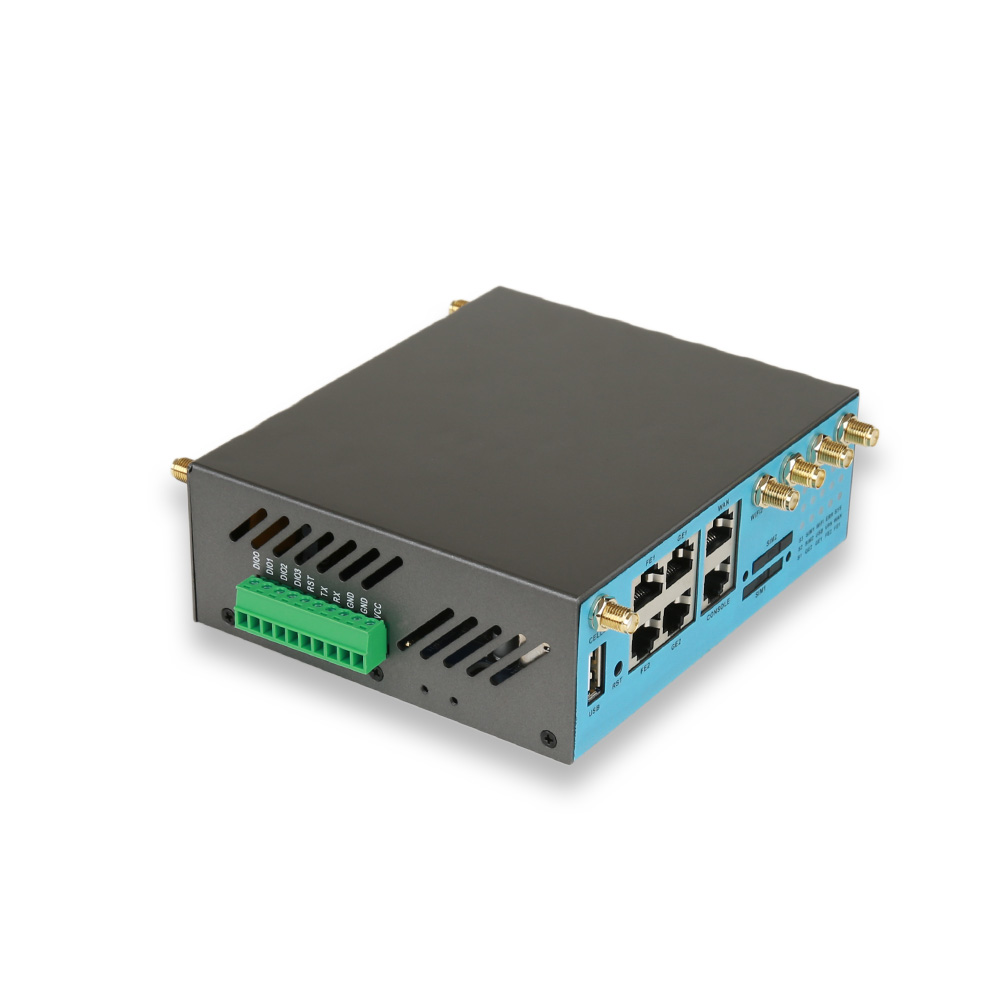
H685frc: Gigabit Ethernet, PoE In, RS232, four DI/DO, Wi-Fi, DIN-rail
Location or direct cloud reporting
H685frc-G: GPS, PoE In, MQTT
Critical site needing operator redundancy
H900frc: dual SIM, Gigabit and Fast Ethernet ports, PoE In, RS232
Mobile or location-aware equipment
H900frc-G: GPS, Gigabit RJ45, PoE In
Small multi-device site or branch
H820frc: five Gigabit ports, PoE In or Out, RS232, DI/DO, SD-WAN
Field devices that must stay online without standalone 5G
H900pfrc: RedCap modem with dual SIM and failover to 4G
Check 4: Which bands and certifications does the variant cover?
Confirm the band list of the exact variant against your operators, and the certifications for your market. E-Lins products carry CE, FCC, and UKCA certification and comply with RoHS.
Check 5: What configuration should ship from the factory?
Agree on VPN, management server, APN, and SIM settings in advance. E-Lins lists firmware behaviour within its customisation scope, and its routers support WireGuard, IPsec and OpenVPN with management through TR-069, SNMP, SSH and the E-Lins NMS cloud platform.
Check 6: How will the routers be powered and mounted?
Many RedCap models support PoE In, which suits pole and ceiling installations. Confirm supply voltage, PoE arrangements, and mounting kits; E-Lins supplies desktop, wall-mount, and DIN-rail options.
Part 2: Samples and Pilot
Check 7: Test on your operators’ standalone networks
Install samples where standalone coverage has been confirmed and where it is marginal. Record connection behaviour, throughput, and reconnection after interruptions.
Check 8: Test fallback behaviour
For sites that rely on 4G fallback, disable standalone coverage or leave it disabled, and confirm the router connects over 4G and returns to RedCap when service is restored.
Check 9: Test the field interfaces
Connect real sensors, PLCs, or meters through Ethernet, RS232, or DI/DO, and confirm data reaches the central platform through the VPN.
Check 10: Test power events
Cut and restore power repeatedly. E-Lins routers include hardware watchdog timers and link self-healing, so they should recover without manual action.
Part 3: Deployment
Check 11: Record coverage per site
During installation, record the network type the router connects to (RedCap or 4G fallback) and the signal level. This makes later troubleshooting much faster.
Check 12: Monitor from day one
Use central management to watch online status and network type across the fleet. The E-Lins NMS provides device status monitoring, parameter management, remote firmware upgrades, and statistics.
Check 13: Plan firmware updates
RedCap networks are still evolving, so firmware updates may improve behaviour over time. E-Lins develops its firmware in-house and provides lifetime free upgrades; stage updates on a small group before rolling them out.
Check 14: Agree support escalation
E-Lins provides 7×24 remote technical support with an average response time of 10 minutes during business hours, packet capture analysis and remote debugging, and reports a 90% remote resolution rate.
Common RedCap Misconceptions
“RedCap is just a cheaper full 5G router.” It is a different device class, with narrower bandwidth, fewer antennas, and no carrier aggregation. It suits moderate data needs, not every 5G application.
“Any 5G coverage will do.” RedCap needs 5G standalone service. A site with only non-standalone 5G will not use RedCap’s 5G capability.
“RedCap replaces all LTE immediately.” In many markets, LTE will remain the coverage layer for years, which is why fallback to 4G matters.
“Lower cost means lower industrial quality.” The cost savings come from the radio design. The rest of the router, its temperature range, power protection, and firmware, should be just as industrial as any other model in the range.
Why Buy RedCap Factory Direct
Buying direct gives access to the engineers who know how the RedCap firmware behaves on different networks, and allows configuration and customisation to be agreed before production. E-Lins manufactures in its own SMT factory and assembly lines in Shenzhen, typically prepares stock in 1 to 2 business days, and reports a 98.5% on-time delivery rate for volume projects. Its RedCap routers share the same industrial baseline as the rest of its range: components rated from -35°C to +75°C, 15KV ESD protection and 1.5KV electromagnetic isolation.
A Note on Mixed Fleets
Few projects use RedCap alone. Most combine RedCap at moderate-data sites, full 5G at high-bandwidth sites, and 4G where standalone 5G is not yet available. Choosing these from the same product families, such as the E-Lins H685, H820 and H900 families, keeps configuration templates, mounting and management consistent across the fleet.
The Supplier
Shenzhen E-Lins Technology Co., Ltd. has supplied industrial wireless communication equipment since its industrial roots in 1999 and released 5G NR industrial routers from 2019, with RedCap now forming a distinct tier between its 4G and full 5G products. E-Lins describes RedCap as a fit for sensor connectivity, compact gateways, and industrial edge devices, and highlights project-based adaptation and customisation for RedCap deployments. Work through the fourteen checks above with any 5G RedCap router factory-direct supplier, and your RedCap rollout will start on solid ground.
https://e-lins.com/
Shenzhen E-Lins Technology Co., Ltd. -
AuthorPosts

- You must be logged in to reply to this topic.